Something new is coming! 🎁 Plus reporting tips, communication reminders, and a call for SEEDS testimonials. ͏  ͏  ͏  ͏  ͏  ͏  ͏  ͏  ͏  ͏  ͏  ͏  ͏  ͏  ͏  ͏  ͏  ͏  ͏  ͏  ͏  ͏  ͏  ͏  ͏  ͏  ͏  ͏  ͏  ͏  ͏  ͏  ͏  ͏  ͏  ͏  ͏  ͏  ͏  ͏  ͏  ͏  ͏  ͏  ͏  ͏  ͏  ͏  ͏  ͏  ͏  ͏  ͏  ͏  ͏  ͏  ͏  ͏  ͏  ͏  ͏  ͏  ͏  ͏  ͏  ͏  ͏  ͏  ͏  ͏  ͏  ͏  ͏  ͏  ͏  ͏  ͏  ͏  ͏  ͏  ͏  ͏  ͏  ͏  ͏  ͏  ͏  ͏  ͏  ͏  ͏  ͏  ͏  ͏  ͏  ͏  ͏  ͏  ͏  ͏  ͏  ͏  ͏  ͏  ͏  ͏  ͏  ͏  ͏  ͏  ͏  ͏  ͏  ͏  ͏  ͏  ͏  ͏  ͏  ͏ ­ ­ ­ ­ ­ ­ ­ ­ ­ ­ ­ ­ ­ ­ ­ ­ ­ ­ ­ ­ ­ ­ ­ ­ ­ ­ ­ ­ ­ ­ ­ ­ ­ ­ ­ ­ ­ ­ ­ ­ ­ ­ ­ ­ ­ ­ ­ ­ ­ ­ ­ ­ ­ ­ ­ ­ ­ ­ ­ ­ ­ ­ ­ ­ ­ ­ ­ ­ ­ ­ ­ ­ ­ ­ ­ ­ ­ ­ ­ ­ ­ ­ ­ ­ ­ ­ ­ ­ ­ ­ ­ ­ ­ ­ ­ ­ ­ ­ ­ ­ ­ ­ ­ ­ ­ ­ ­ ­ ­ ­ ­ ­ ­ ­ ­ ­ ­ ­ ­ ­ ­ ­ ­ ­ ­ ­ ­ ­ ­ ­ ­ ­ ­ ­ ­ ­ ­ ­ ­ ­ ­ ­ ­ ­ ­ ­ ­ ­ ­ ­ ­ ­ ­ ­ ­ ­ ­ ­ ­ ­ ­ ­ ­ ­ ­ ­ ­ ­ ­ ­ ­ ­ ­ ­ ­ ­ ­ ­ ­ ­ ­ ­ ­ ­ ­ ­ ­ ­ ­ ­ ­ ­ ­ ­ ­    ͏  ͏  ͏  ͏  ͏  ͏  ͏  ͏  ͏  ͏  ͏  ͏  ͏  ͏  ͏  ͏  ͏  ͏  ͏  ͏  ͏  ͏  ͏  ͏  ͏  ͏  ͏  ͏  ͏  ͏  ͏  ͏  ͏  ͏  ͏  ͏  ͏  ͏  ͏  ͏  ͏  ͏  ͏  ͏  ͏  ͏  ͏  ͏  ͏  ͏  ͏  ͏  ͏  ͏  ͏  ͏  ͏  ͏  ͏  ͏  ͏  ͏  ͏  ͏  ͏  ͏  ͏  ͏  ͏  ͏  ͏  ͏  ͏  ͏  ͏  ͏  ͏  ͏  ͏  ͏  ͏  ͏  ͏  ͏  ͏  ͏  ͏  ͏  ͏  ͏  ͏  ͏  ͏  ͏  ͏  ͏  ͏  ͏  ͏  ͏  ͏  ͏  ͏  ͏  ͏  ͏  ͏  ͏  ͏  ͏  ͏  ͏  ͏  ͏  ͏  ͏  ͏  ͏  ͏  ͏ ­ ­ ­ ­ ­ ­ ­ ­ ­ ­ ­ ­ ­ ­ ­ ­ ­ ­ ­ ­ ­ ­ ­ ­ ­ ­ ­ ­ ­ ­ ­ ­ ­ ­ ­ ­ ­ ­ ­ ­ ­ ­ ­ ­ ­ ­ ­ ­ ­ ­ ­ ­ ­ ­ ­ ­ ­ ­ ­ ­ ­ ­ ­ ­ ­ ­ ­ ­ ­ ­ ­ ­ ­ ­ ­ ­ ­ ­ ­ ­ ­ ­ ­ ­ ­ ­ ­ ­ ­ ­ ­ ­ ­ ­ ­ ­ ­ ­ ­ ­ ­ ­ ­ ­ ­ ­ ­ ­ ­ ­ ­ ­ ­ ­ ­ ­ ­ ­ ­ ­ ­ ­ ­ ­ ­ ­ ­ ­ ­ ­ ­ ­ ­ ­ ­ ­ ­ ­ ­ ­ ­ ­ ­ ­ ­ ­ ­ ­ ­ ­ ­ ­ ­ ­ ­ ­ ­ ­ ­ ­ ­ ­ ­ ­ ­ ­ ­ ­ ­ ­ ­ ­ ­ ­ ­ ­ ­ ­ ­ ­ ­ ­ ­ ­ ­ ­ ­ ­ ­ ­ ­ ­ ­ ­ ­  





View in browser
EmailBkgd_Navy_IEPLogo_Light_150

March 2026 Spotlight

Something New on the Horizon ✨✨✨

We’re currently testing an exciting new feature that will eliminate the need for a SIS integration — and save valuable time for staff who update student and parent information in SEEDS and IEP4Schools.


To ensure districts have the best possible experience, we’ll be conducting beta testing with selected districts in the coming weeks. We’re also developing helpful supports for districts that choose to take advantage of this new functionality.


Curious to learn more? Join us for an informational webinar on March 11 to see what all the buzz is about! Registration details are below.

Unbox_Green
Register for March 11

Communication Pathways

Email the Help Desk

There are several ways to connect with Kim and Christine when you need assistance with SEEDS. Some of you use the chat feature, and others access support through the Help icon — but did you know we also have a direct support email?


📬 support.iep@4schools.net


This email can be used directly from your inbox — no need to be logged into SEEDS. Using this address (instead of emailing Kim or Christine individually) ensures that either of us can respond and allows us to properly track requests if follow-up is needed.


As always, please contact your system administrator first, as they are your district’s first line of support. If you still need assistance, send an email to support.iep@4schools.net. We’re here to help!


updated shout out picture

Shout Out 📣

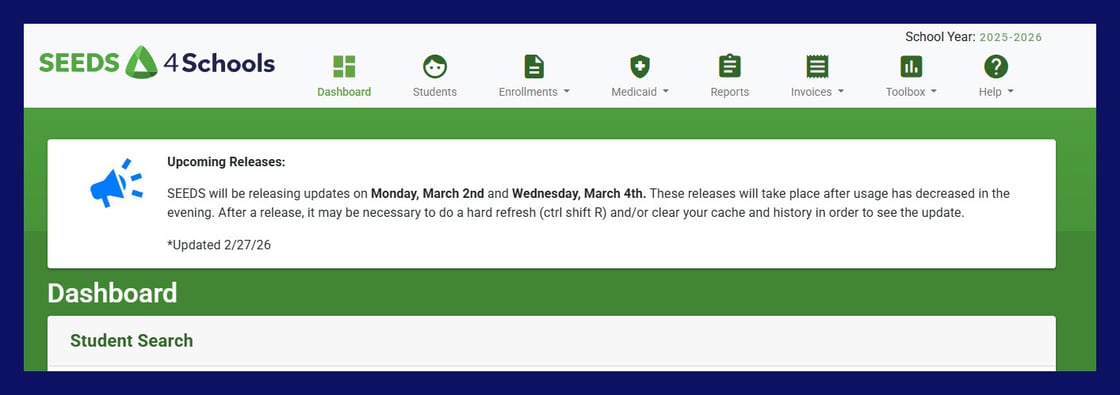
Our support email is a fast way for you to reach us — but do you know how we quickly communicate with you? 


The Shout Out at the top of the SEEDS Dashboard is where we share timely updates with our customers. This is where you’ll find:

  • Upcoming releases

  • Important updates

  • High-priority bug alerts

  • Timely tips

Be sure to check the Shout Out each time you log in — you’ll be glad you did!

Feature Focus: Reports

Finding the Right Report

SEEDS offers a wide variety of reports — many of which can be used in multiple ways. The key is to start by identifying your goal and the specific data points you need.  Here is an  example:


"I need to balance caseloads for next year, but I’m not ready to create new class lists yet."


In this case, your goal is a workable document to help balance class lists. The data you need might include student names, grade levels, and current class lists. You’ll also want to begin with a report that can be exported to CSV so you can sort and manipulate the data in a spreadsheet.

Good starting reports for this scenario include:

  • Export of Student Data

  • Enrollment History by Year

  • Itinerant Services Class List

Once you have your base report, you can pull additional supporting data from other reports and add it to your spreadsheet to help you create balanced class lists with confidence.


Learn More - Reports Webinar Slides

Warm Welcome

And the Districts Keep Coming!

The IEP4Schools community continues to grow.  That shows how having such active and engaged users can make a product that stands the test of time. Please join us in giving a warm welcome to:

Prentice School District logo

Always Be Learning

Upcoming Events

Join us for these upcoming IEP4Schools events:

  • March 9, 9:00 - 11:00 - Sending TIE Records - This session will focus on checking the status of your TIE records and making sure they are submitted for the year.
  • May 27, 9:00 - 12:00 - SEEDS End of the School Year Prep - Prepare for the end of the school year!  Topics include getting ready for summer and annual rollover.
  • June 4th, 12:00 - 3:00 - SEEDS End of the School Year Prep (Repeat)


Calendar_Green
Register Here

Tell Us Why You Love SEEDS 💚

Testimonials Wanted

We’re looking for customer testimonials to use in our sales and marketing materials — and we know our best advocates are the districts already using SEEDS  every day.


If you’d be willing to share your experience, we’d love to hear from you! With your permission, we may feature your name and district to help prospective customers see the impact SEEDS is making.


Interested? Let us know — we can’t wait to share your story!


Share Your Story

4Schools_2024_IEP_Horizontal-02_CESA6_Color

4Schools by CESA 6  • 2300 State Road 44  •  Oshkosh WI 54904

4Schools.net